Table of Contents
- 16.1 Setting the Storage Engine
- 16.2 The MyISAM Storage Engine
- 16.3 The MEMORY Storage Engine
- 16.4 The CSV Storage Engine
- 16.5 The ARCHIVE Storage Engine
- 16.6 The BLACKHOLE Storage Engine
- 16.7 The MERGE Storage Engine
- 16.8 The FEDERATED Storage Engine
- 16.9 The EXAMPLE Storage Engine
- 16.10 Other Storage Engines
- 16.11 Overview of MySQL Storage Engine Architecture
Storage engines are MySQL components that handle the SQL operations
for different table types. InnoDB is
the default and most general-purpose storage engine, and Oracle
recommends using it for tables except for specialized use cases.
(The CREATE TABLE statement in MySQL
8.0 creates InnoDB tables by
default.)
MySQL Server uses a pluggable storage engine architecture that enables storage engines to be loaded into and unloaded from a running MySQL server.
To determine which storage engines your server supports, use the
SHOW ENGINES statement. The value in
the Support column indicates whether an engine
can be used. A value of YES,
NO, or DEFAULT indicates that
an engine is available, not available, or available and currently
set as the default storage engine.
mysql> SHOW ENGINES\G
*************************** 1. row ***************************
      Engine: PERFORMANCE_SCHEMA
     Support: YES
     Comment: Performance Schema
Transactions: NO
          XA: NO
  Savepoints: NO
*************************** 2. row ***************************
      Engine: InnoDB
     Support: DEFAULT
     Comment: Supports transactions, row-level locking, and foreign keys
Transactions: YES
          XA: YES
  Savepoints: YES
*************************** 3. row ***************************
      Engine: MRG_MYISAM
     Support: YES
     Comment: Collection of identical MyISAM tables
Transactions: NO
          XA: NO
  Savepoints: NO
*************************** 4. row ***************************
      Engine: BLACKHOLE
     Support: YES
     Comment: /dev/null storage engine (anything you write to it disappears)
Transactions: NO
          XA: NO
  Savepoints: NO
*************************** 5. row ***************************
      Engine: MyISAM
     Support: YES
     Comment: MyISAM storage engine
Transactions: NO
          XA: NO
  Savepoints: NO
...
This chapter covers use cases for special-purpose MySQL storage
engines. It does not cover the default
InnoDB storage engine or the
NDB storage engine which are covered in
Chapter 15, The InnoDB Storage Engine and
Chapter 23, MySQL NDB Cluster 8.0. For advanced users, it also
contains a description of the pluggable storage engine architecture
(see Section 16.11, “Overview of MySQL Storage Engine Architecture”).
For information about features offered in commercial MySQL Server binaries, see MySQL Editions, on the MySQL website. The storage engines available might depend on which edition of MySQL you are using.
For answers to commonly asked questions about MySQL storage engines, see Section A.2, “MySQL 8.0 FAQ: Storage Engines”.
MySQL 8.0 Supported Storage Engines
InnoDB: The default storage engine in MySQL 8.0.InnoDBis a transaction-safe (ACID compliant) storage engine for MySQL that has commit, rollback, and crash-recovery capabilities to protect user data.InnoDBrow-level locking (without escalation to coarser granularity locks) and Oracle-style consistent nonlocking reads increase multi-user concurrency and performance.InnoDBstores user data in clustered indexes to reduce I/O for common queries based on primary keys. To maintain data integrity,InnoDBalso supportsFOREIGN KEYreferential-integrity constraints. For more information aboutInnoDB, see Chapter 15, The InnoDB Storage Engine.MyISAM: These tables have a small footprint. Table-level locking limits the performance in read/write workloads, so it is often used in read-only or read-mostly workloads in Web and data warehousing configurations.Memory: Stores all data in RAM, for fast access in environments that require quick lookups of non-critical data. This engine was formerly known as theHEAPengine. Its use cases are decreasing;InnoDBwith its buffer pool memory area provides a general-purpose and durable way to keep most or all data in memory, andNDBCLUSTERprovides fast key-value lookups for huge distributed data sets.CSV: Its tables are really text files with comma-separated values. CSV tables let you import or dump data in CSV format, to exchange data with scripts and applications that read and write that same format. Because CSV tables are not indexed, you typically keep the data inInnoDBtables during normal operation, and only use CSV tables during the import or export stage.Archive: These compact, unindexed tables are intended for storing and retrieving large amounts of seldom-referenced historical, archived, or security audit information.Blackhole: The Blackhole storage engine accepts but does not store data, similar to the Unix/dev/nulldevice. Queries always return an empty set. These tables can be used in replication configurations where DML statements are sent to replica servers, but the source server does not keep its own copy of the data.NDB(also known asNDBCLUSTER): This clustered database engine is particularly suited for applications that require the highest possible degree of uptime and availability.Merge: Enables a MySQL DBA or developer to logically group a series of identicalMyISAMtables and reference them as one object. Good for VLDB environments such as data warehousing.Federated: Offers the ability to link separate MySQL servers to create one logical database from many physical servers. Very good for distributed or data mart environments.Example: This engine serves as an example in the MySQL source code that illustrates how to begin writing new storage engines. It is primarily of interest to developers. The storage engine is a “stub” that does nothing. You can create tables with this engine, but no data can be stored in them or retrieved from them.
You are not restricted to using the same storage engine for an
entire server or schema. You can specify the storage engine for any
table. For example, an application might use mostly
InnoDB tables, with one CSV
table for exporting data to a spreadsheet and a few
MEMORY tables for temporary workspaces.
Choosing a Storage Engine
The various storage engines provided with MySQL are designed with different use cases in mind. The following table provides an overview of some storage engines provided with MySQL, with clarifying notes following the table.
Table 16.1 Storage Engines Feature Summary
| Feature | MyISAM | Memory | InnoDB | Archive | NDB |
|---|---|---|---|---|---|
| B-tree indexes | Yes | Yes | Yes | No | No |
| Backup/point-in-time recovery (note 1) | Yes | Yes | Yes | Yes | Yes |
| Cluster database support | No | No | No | No | Yes |
| Clustered indexes | No | No | Yes | No | No |
| Compressed data | Yes (note 2) | No | Yes | Yes | No |
| Data caches | No | N/A | Yes | No | Yes |
| Encrypted data | Yes (note 3) | Yes (note 3) | Yes (note 4) | Yes (note 3) | Yes (note 3) |
| Foreign key support | No | No | Yes | No | Yes (note 5) |
| Full-text search indexes | Yes | No | Yes (note 6) | No | No |
| Geospatial data type support | Yes | No | Yes | Yes | Yes |
| Geospatial indexing support | Yes | No | Yes (note 7) | No | No |
| Hash indexes | No | Yes | No (note 8) | No | Yes |
| Index caches | Yes | N/A | Yes | No | Yes |
| Locking granularity | Table | Table | Row | Row | Row |
| MVCC | No | No | Yes | No | No |
| Replication support (note 1) | Yes | Limited (note 9) | Yes | Yes | Yes |
| Storage limits | 256TB | RAM | 64TB | None | 384EB |
| T-tree indexes | No | No | No | No | Yes |
| Transactions | No | No | Yes | No | Yes |
| Update statistics for data dictionary | Yes | Yes | Yes | Yes | Yes |
Notes:
1. Implemented in the server, rather than in the storage engine.
2. Compressed MyISAM tables are supported only when using the compressed row format. Tables using the compressed row format with MyISAM are read only.
3. Implemented in the server via encryption functions.
4. Implemented in the server via encryption functions; In MySQL 5.7 and later, data-at-rest tablespace encryption is supported.
5. Support for foreign keys is available in MySQL Cluster NDB 7.3 and later.
6. InnoDB support for FULLTEXT indexes is available in MySQL 5.6 and later.
7. InnoDB support for geospatial indexing is available in MySQL 5.7 and later.
8. InnoDB utilizes hash indexes internally for its Adaptive Hash Index feature.
9. See the discussion later in this section.
When you create a new table, you can specify which storage engine
to use by adding an ENGINE table option to the
CREATE TABLE statement:
-- ENGINE=INNODB not needed unless you have set a different
-- default storage engine.
CREATE TABLE t1 (i INT) ENGINE = INNODB;
-- Simple table definitions can be switched from one to another.
CREATE TABLE t2 (i INT) ENGINE = CSV;
CREATE TABLE t3 (i INT) ENGINE = MEMORY;
When you omit the ENGINE option, the default
storage engine is used. The default engine is
InnoDB in MySQL 8.0. You
can specify the default engine by using the
--default-storage-engine server
startup option, or by setting the
default-storage-engine option in
the my.cnf configuration file.
You can set the default storage engine for the current session by
setting the
default_storage_engine variable:
SET default_storage_engine=NDBCLUSTER;
The storage engine for TEMPORARY tables created
with CREATE
TEMPORARY TABLE can be set separately from the engine
for permanent tables by setting the
default_tmp_storage_engine,
either at startup or at runtime.
To convert a table from one storage engine to another, use an
ALTER TABLE statement that
indicates the new engine:
ALTER TABLE t ENGINE = InnoDB;
See Section 13.1.20, “CREATE TABLE Statement”, and Section 13.1.9, “ALTER TABLE Statement”.
If you try to use a storage engine that is not compiled in or that
is compiled in but deactivated, MySQL instead creates a table
using the default storage engine. For example, in a replication
setup, perhaps your source server uses InnoDB
tables for maximum safety, but the replica servers use other
storage engines for speed at the expense of durability or
concurrency.
By default, a warning is generated whenever
CREATE TABLE or
ALTER TABLE cannot use the default
storage engine. To prevent confusing, unintended behavior if the
desired engine is unavailable, enable the
NO_ENGINE_SUBSTITUTION SQL mode.
If the desired engine is unavailable, this setting produces an
error instead of a warning, and the table is not created or
altered. See Section 5.1.11, “Server SQL Modes”.
MySQL may store a table's index and data in one or more other files, depending on the storage engine. Table and column definitions are stored in the MySQL data dictionary. Individual storage engines create any additional files required for the tables that they manage. If a table name contains special characters, the names for the table files contain encoded versions of those characters as described in Section 9.2.4, “Mapping of Identifiers to File Names”.
MyISAM is based on the older (and no longer
available) ISAM storage engine but has many
useful extensions.
Table 16.2 MyISAM Storage Engine Features
| Feature | Support |
|---|---|
| B-tree indexes | Yes |
| Backup/point-in-time recovery (Implemented in the server, rather than in the storage engine.) | Yes |
| Cluster database support | No |
| Clustered indexes | No |
| Compressed data | Yes (Compressed MyISAM tables are supported only when using the compressed row format. Tables using the compressed row format with MyISAM are read only.) |
| Data caches | No |
| Encrypted data | Yes (Implemented in the server via encryption functions.) |
| Foreign key support | No |
| Full-text search indexes | Yes |
| Geospatial data type support | Yes |
| Geospatial indexing support | Yes |
| Hash indexes | No |
| Index caches | Yes |
| Locking granularity | Table |
| MVCC | No |
| Replication support (Implemented in the server, rather than in the storage engine.) | Yes |
| Storage limits | 256TB |
| T-tree indexes | No |
| Transactions | No |
| Update statistics for data dictionary | Yes |
Each MyISAM table is stored on disk in two files.
The files have names that begin with the table name and have an
extension to indicate the file type. The data file has an
.MYD (MYData) extension. The
index file has an .MYI
(MYIndex) extension. The table definition is
stored in the MySQL data dictionary.
To specify explicitly that you want a MyISAM
table, indicate that with an ENGINE table option:
CREATE TABLE t (i INT) ENGINE = MYISAM;
In MySQL 8.0, it is normally necessary to use
ENGINE to specify the MyISAM
storage engine because InnoDB is the default
engine.
You can check or repair MyISAM tables with the
mysqlcheck client or myisamchk
utility. You can also compress MyISAM tables with
myisampack to take up much less space. See
Section 4.5.3, “mysqlcheck — A Table Maintenance Program”, Section 4.6.4, “myisamchk — MyISAM Table-Maintenance Utility”, and
Section 4.6.6, “myisampack — Generate Compressed, Read-Only MyISAM Tables”.
In MySQL 8.0, the MyISAM storage
engine provides no partitioning support. Partitioned
MyISAM tables created in previous versions of
MySQL cannot be used in MySQL 8.0. For more
information, see
Section 24.6.2, “Partitioning Limitations Relating to Storage Engines”. For help
with upgrading such tables so that they can be used in MySQL
8.0, see
Section 2.11.4, “Changes in MySQL 8.0”.
MyISAM tables have the following characteristics:
All data values are stored with the low byte first. This makes the data machine and operating system independent. The only requirements for binary portability are that the machine uses two's-complement signed integers and IEEE floating-point format. These requirements are widely used among mainstream machines. Binary compatibility might not be applicable to embedded systems, which sometimes have peculiar processors.
There is no significant speed penalty for storing data low byte first; the bytes in a table row normally are unaligned and it takes little more processing to read an unaligned byte in order than in reverse order. Also, the code in the server that fetches column values is not time critical compared to other code.
All numeric key values are stored with the high byte first to permit better index compression.
Large files (up to 63-bit file length) are supported on file systems and operating systems that support large files.
There is a limit of (232)2 (1.844E+19) rows in a
MyISAMtable.The maximum number of indexes per
MyISAMtable is 64.The maximum number of columns per index is 16.
The maximum key length is 1000 bytes. This can also be changed by changing the source and recompiling. For the case of a key longer than 250 bytes, a larger key block size than the default of 1024 bytes is used.
When rows are inserted in sorted order (as when you are using an
AUTO_INCREMENTcolumn), the index tree is split so that the high node only contains one key. This improves space utilization in the index tree.Internal handling of one
AUTO_INCREMENTcolumn per table is supported.MyISAMautomatically updates this column forINSERTandUPDATEoperations. This makesAUTO_INCREMENTcolumns faster (at least 10%). Values at the top of the sequence are not reused after being deleted. (When anAUTO_INCREMENTcolumn is defined as the last column of a multiple-column index, reuse of values deleted from the top of a sequence does occur.) TheAUTO_INCREMENTvalue can be reset withALTER TABLEor myisamchk.Dynamic-sized rows are much less fragmented when mixing deletes with updates and inserts. This is done by automatically combining adjacent deleted blocks and by extending blocks if the next block is deleted.
MyISAMsupports concurrent inserts: If a table has no free blocks in the middle of the data file, you canINSERTnew rows into it at the same time that other threads are reading from the table. A free block can occur as a result of deleting rows or an update of a dynamic length row with more data than its current contents. When all free blocks are used up (filled in), future inserts become concurrent again. See Section 8.11.3, “Concurrent Inserts”.You can put the data file and index file in different directories on different physical devices to get more speed with the
DATA DIRECTORYandINDEX DIRECTORYtable options toCREATE TABLE. See Section 13.1.20, “CREATE TABLE Statement”.NULLvalues are permitted in indexed columns. This takes 0 to 1 bytes per key.Each character column can have a different character set. See Chapter 10, Character Sets, Collations, Unicode.
There is a flag in the
MyISAMindex file that indicates whether the table was closed correctly. If mysqld is started with themyisam_recover_optionssystem variable set,MyISAMtables are automatically checked when opened, and are repaired if the table wasn't closed properly.myisamchk marks tables as checked if you run it with the
--update-stateoption. myisamchk --fast checks only those tables that don't have this mark.myisamchk --analyze stores statistics for portions of keys, as well as for entire keys.
myisampack can pack
BLOBandVARCHARcolumns.
MyISAM also supports the following features:
Additional Resources
A forum dedicated to the
MyISAMstorage engine is available at https://forums.mysql.com/list.php?21.
The following options to mysqld can be used to
change the behavior of MyISAM tables. For
additional information, see Section 5.1.7, “Server Command Options”.
Table 16.3 MyISAM Option and Variable Reference
| Name | Cmd-Line | Option File | System Var | Status Var | Var Scope | Dynamic |
|---|---|---|---|---|---|---|
| bulk_insert_buffer_size | Yes | Yes | Yes | Both | Yes | |
| concurrent_insert | Yes | Yes | Yes | Global | Yes | |
| delay_key_write | Yes | Yes | Yes | Global | Yes | |
| have_rtree_keys | Yes | Global | No | |||
| key_buffer_size | Yes | Yes | Yes | Global | Yes | |
| log-isam | Yes | Yes | ||||
| myisam-block-size | Yes | Yes | ||||
| myisam_data_pointer_size | Yes | Yes | Yes | Global | Yes | |
| myisam_max_sort_file_size | Yes | Yes | Yes | Global | Yes | |
| myisam_mmap_size | Yes | Yes | Yes | Global | No | |
| myisam_recover_options | Yes | Yes | Yes | Global | No | |
| myisam_repair_threads | Yes | Yes | Yes | Both | Yes | |
| myisam_sort_buffer_size | Yes | Yes | Yes | Both | Yes | |
| myisam_stats_method | Yes | Yes | Yes | Both | Yes | |
| myisam_use_mmap | Yes | Yes | Yes | Global | Yes | |
| tmp_table_size | Yes | Yes | Yes | Both | Yes |
The following system variables affect the behavior of
MyISAM tables. For additional information, see
Section 5.1.8, “Server System Variables”.
The size of the tree cache used in bulk insert optimization.
NoteThis is a limit per thread!
Don't flush key buffers between writes for any
MyISAMtable.NoteIf you do this, you should not access
MyISAMtables from another program (such as from another MySQL server or with myisamchk) when the tables are in use. Doing so risks index corruption. Using--external-lockingdoes not eliminate this risk.The maximum size of the temporary file that MySQL is permitted to use while re-creating a
MyISAMindex (duringREPAIR TABLE,ALTER TABLE, orLOAD DATA). If the file size would be larger than this value, the index is created using the key cache instead, which is slower. The value is given in bytes.Set the mode for automatic recovery of crashed
MyISAMtables.Set the size of the buffer used when recovering tables.
Automatic recovery is activated if you start
mysqld with the
myisam_recover_options system
variable set. In this case, when the server opens a
MyISAM table, it checks whether the table is
marked as crashed or whether the open count variable for the table
is not 0 and you are running the server with external locking
disabled. If either of these conditions is true, the following
happens:
The server checks the table for errors.
If the server finds an error, it tries to do a fast table repair (with sorting and without re-creating the data file).
If the repair fails because of an error in the data file (for example, a duplicate-key error), the server tries again, this time re-creating the data file.
If the repair still fails, the server tries once more with the old repair option method (write row by row without sorting). This method should be able to repair any type of error and has low disk space requirements.
If the recovery wouldn't be able to recover all rows from
previously completed statements and you didn't specify
FORCE in the value of the
myisam_recover_options system
variable, automatic repair aborts with an error message in the
error log:
Error: Couldn't repair table: test.g00pages
If you specify FORCE, a warning like this is
written instead:
Warning: Found 344 of 354 rows when repairing ./test/g00pages
If the automatic recovery value includes
BACKUP, the recovery process creates files with
names of the form
tbl_name-datetime.BAK
MyISAM tables use B-tree indexes. You can
roughly calculate the size for the index file as
(key_length+4)/0.67, summed over all keys. This
is for the worst case when all keys are inserted in sorted order
and the table doesn't have any compressed keys.
String indexes are space compressed. If the first index part is a
string, it is also prefix compressed. Space compression makes the
index file smaller than the worst-case figure if a string column
has a lot of trailing space or is a
VARCHAR column that is not always
used to the full length. Prefix compression is used on keys that
start with a string. Prefix compression helps if there are many
strings with an identical prefix.
In MyISAM tables, you can also prefix compress
numbers by specifying the PACK_KEYS=1 table
option when you create the table. Numbers are stored with the high
byte first, so this helps when you have many integer keys that
have an identical prefix.
MyISAM supports three different storage
formats. Two of them, fixed and dynamic format, are chosen
automatically depending on the type of columns you are using. The
third, compressed format, can be created only with the
myisampack utility (see
Section 4.6.6, “myisampack — Generate Compressed, Read-Only MyISAM Tables”).
When you use CREATE TABLE or
ALTER TABLE for a table that has no
BLOB or
TEXT columns, you can force the
table format to FIXED or
DYNAMIC with the ROW_FORMAT
table option.
See Section 13.1.20, “CREATE TABLE Statement”, for information about
ROW_FORMAT.
You can decompress (unpack) compressed MyISAM
tables using myisamchk
--unpack; see
Section 4.6.4, “myisamchk — MyISAM Table-Maintenance Utility”, for more information.
Static format is the default for MyISAM
tables. It is used when the table contains no variable-length
columns (VARCHAR,
VARBINARY,
BLOB, or
TEXT). Each row is stored using a
fixed number of bytes.
Of the three MyISAM storage formats, static
format is the simplest and most secure (least subject to
corruption). It is also the fastest of the on-disk formats due
to the ease with which rows in the data file can be found on
disk: To look up a row based on a row number in the index,
multiply the row number by the row length to calculate the row
position. Also, when scanning a table, it is very easy to read a
constant number of rows with each disk read operation.
The security is evidenced if your computer crashes while the
MySQL server is writing to a fixed-format
MyISAM file. In this case,
myisamchk can easily determine where each row
starts and ends, so it can usually reclaim all rows except the
partially written one. MyISAM table indexes
can always be reconstructed based on the data rows.
Fixed-length row format is available only for tables having no
BLOB or
TEXT columns. Creating a table
having such columns with an explicit
ROW_FORMAT clause does not raise an error
or warning; the format specification is ignored.
Static-format tables have these characteristics:
CHARandVARCHARcolumns are space-padded to the specified column width, although the column type is not altered.BINARYandVARBINARYcolumns are padded with0x00bytes to the column width.NULLcolumns require additional space in the row to record whether their values areNULL. EachNULLcolumn takes one bit extra, rounded up to the nearest byte.Very quick.
Easy to cache.
Easy to reconstruct after a crash, because rows are located in fixed positions.
Reorganization is unnecessary unless you delete a huge number of rows and want to return free disk space to the operating system. To do this, use
OPTIMIZE TABLEor myisamchk -r.Usually require more disk space than dynamic-format tables.
The expected row length in bytes for static-sized rows is calculated using the following expression:
row length = 1 + (sum of column lengths) + (number of NULL columns+delete_flag+ 7)/8 + (number of variable-length columns)delete_flagis 1 for tables with static row format. Static tables use a bit in the row record for a flag that indicates whether the row has been deleted.delete_flagis 0 for dynamic tables because the flag is stored in the dynamic row header.
Dynamic storage format is used if a MyISAM
table contains any variable-length columns
(VARCHAR,
VARBINARY,
BLOB, or
TEXT), or if the table was
created with the ROW_FORMAT=DYNAMIC table
option.
Dynamic format is a little more complex than static format because each row has a header that indicates how long it is. A row can become fragmented (stored in noncontiguous pieces) when it is made longer as a result of an update.
You can use OPTIMIZE TABLE or
myisamchk -r to defragment a table. If you
have fixed-length columns that you access or change frequently
in a table that also contains some variable-length columns, it
might be a good idea to move the variable-length columns to
other tables just to avoid fragmentation.
Dynamic-format tables have these characteristics:
All string columns are dynamic except those with a length less than four.
Each row is preceded by a bitmap that indicates which columns contain the empty string (for string columns) or zero (for numeric columns). This does not include columns that contain
NULLvalues. If a string column has a length of zero after trailing space removal, or a numeric column has a value of zero, it is marked in the bitmap and not saved to disk. Nonempty strings are saved as a length byte plus the string contents.NULLcolumns require additional space in the row to record whether their values areNULL. EachNULLcolumn takes one bit extra, rounded up to the nearest byte.Much less disk space usually is required than for fixed-length tables.
Each row uses only as much space as is required. However, if a row becomes larger, it is split into as many pieces as are required, resulting in row fragmentation. For example, if you update a row with information that extends the row length, the row becomes fragmented. In this case, you may have to run
OPTIMIZE TABLEor myisamchk -r from time to time to improve performance. Use myisamchk -ei to obtain table statistics.More difficult than static-format tables to reconstruct after a crash, because rows may be fragmented into many pieces and links (fragments) may be missing.
The expected row length for dynamic-sized rows is calculated using the following expression:
3 + (
number of columns+ 7) / 8 + (number of char columns) + (packed size of numeric columns) + (length of strings) + (number of NULL columns+ 7) / 8There is a penalty of 6 bytes for each link. A dynamic row is linked whenever an update causes an enlargement of the row. Each new link is at least 20 bytes, so the next enlargement probably goes in the same link. If not, another link is created. You can find the number of links using myisamchk -ed. All links may be removed with
OPTIMIZE TABLEor myisamchk -r.
Compressed storage format is a read-only format that is generated with the myisampack tool. Compressed tables can be uncompressed with myisamchk.
Compressed tables have the following characteristics:
Compressed tables take very little disk space. This minimizes disk usage, which is helpful when using slow disks (such as CD-ROMs).
Each row is compressed separately, so there is very little access overhead. The header for a row takes up one to three bytes depending on the biggest row in the table. Each column is compressed differently. There is usually a different Huffman tree for each column. Some of the compression types are:
Suffix space compression.
Prefix space compression.
Numbers with a value of zero are stored using one bit.
If values in an integer column have a small range, the column is stored using the smallest possible type. For example, a
BIGINTcolumn (eight bytes) can be stored as aTINYINTcolumn (one byte) if all its values are in the range from-128to127.If a column has only a small set of possible values, the data type is converted to
ENUM.A column may use any combination of the preceding compression types.
Can be used for fixed-length or dynamic-length rows.
While a compressed table is read only, and you cannot
therefore update or add rows in the table, DDL (Data
Definition Language) operations are still valid. For example,
you may still use DROP to drop the table,
and TRUNCATE TABLE to empty the
table.
The file format that MySQL uses to store data has been extensively tested, but there are always circumstances that may cause database tables to become corrupted. The following discussion describes how this can happen and how to handle it.
Even though the MyISAM table format is very
reliable (all changes to a table made by an SQL statement are
written before the statement returns), you can still get
corrupted tables if any of the following events occur:
The mysqld process is killed in the middle of a write.
An unexpected computer shutdown occurs (for example, the computer is turned off).
Hardware failures.
You are using an external program (such as myisamchk) to modify a table that is being modified by the server at the same time.
A software bug in the MySQL or
MyISAMcode.
Typical symptoms of a corrupt table are:
You get the following error while selecting data from the table:
Incorrect key file for table: '...'. Try to repair it
Queries don't find rows in the table or return incomplete results.
You can check the health of a MyISAM table
using the CHECK TABLE statement,
and repair a corrupted MyISAM table with
REPAIR TABLE. When
mysqld is not running, you can also check or
repair a table with the myisamchk command.
See Section 13.7.3.2, “CHECK TABLE Statement”,
Section 13.7.3.5, “REPAIR TABLE Statement”, and Section 4.6.4, “myisamchk — MyISAM Table-Maintenance Utility”.
If your tables become corrupted frequently, you should try to
determine why this is happening. The most important thing to
know is whether the table became corrupted as a result of an
unexpected server exit. You can verify this easily by looking
for a recent restarted mysqld message in the
error log. If there is such a message, it is likely that table
corruption is a result of the server dying. Otherwise,
corruption may have occurred during normal operation. This is a
bug. You should try to create a reproducible test case that
demonstrates the problem. See Section B.3.3.3, “What to Do If MySQL Keeps Crashing”, and
Section 5.9, “Debugging MySQL”.
Each MyISAM index file
(.MYI file) has a counter in the header
that can be used to check whether a table has been closed
properly. If you get the following warning from
CHECK TABLE or
myisamchk, it means that this counter has
gone out of sync:
clients are using or haven't closed the table properly
This warning doesn't necessarily mean that the table is corrupted, but you should at least check the table.
The counter works as follows:
The first time a table is updated in MySQL, a counter in the header of the index files is incremented.
The counter is not changed during further updates.
When the last instance of a table is closed (because a
FLUSH TABLESoperation was performed or because there is no room in the table cache), the counter is decremented if the table has been updated at any point.When you repair the table or check the table and it is found to be okay, the counter is reset to zero.
To avoid problems with interaction with other processes that might check the table, the counter is not decremented on close if it was zero.
In other words, the counter can become incorrect only under these conditions:
A
MyISAMtable is copied without first issuingLOCK TABLESandFLUSH TABLES.MySQL has crashed between an update and the final close. (The table may still be okay because MySQL always issues writes for everything between each statement.)
A table was modified by myisamchk --recover or myisamchk --update-state at the same time that it was in use by mysqld.
Multiple mysqld servers are using the table and one server performed a
REPAIR TABLEorCHECK TABLEon the table while it was in use by another server. In this setup, it is safe to useCHECK TABLE, although you might get the warning from other servers. However,REPAIR TABLEshould be avoided because when one server replaces the data file with a new one, this is not known to the other servers.In general, it is a bad idea to share a data directory among multiple servers. See Section 5.8, “Running Multiple MySQL Instances on One Machine”, for additional discussion.
The MEMORY storage engine (formerly known as
HEAP) creates special-purpose tables with
contents that are stored in memory. Because the data is vulnerable
to crashes, hardware issues, or power outages, only use these tables
as temporary work areas or read-only caches for data pulled from
other tables.
Table 16.4 MEMORY Storage Engine Features
| Feature | Support |
|---|---|
| B-tree indexes | Yes |
| Backup/point-in-time recovery (Implemented in the server, rather than in the storage engine.) | Yes |
| Cluster database support | No |
| Clustered indexes | No |
| Compressed data | No |
| Data caches | N/A |
| Encrypted data | Yes (Implemented in the server via encryption functions.) |
| Foreign key support | No |
| Full-text search indexes | No |
| Geospatial data type support | No |
| Geospatial indexing support | No |
| Hash indexes | Yes |
| Index caches | N/A |
| Locking granularity | Table |
| MVCC | No |
| Replication support (Implemented in the server, rather than in the storage engine.) | Limited (See the discussion later in this section.) |
| Storage limits | RAM |
| T-tree indexes | No |
| Transactions | No |
| Update statistics for data dictionary | Yes |
Developers looking to deploy applications that use the
MEMORY storage engine for important, highly
available, or frequently updated data should consider whether NDB
Cluster is a better choice. A typical use case for the
MEMORY engine involves these characteristics:
Operations involving transient, non-critical data such as session management or caching. When the MySQL server halts or restarts, the data in
MEMORYtables is lost.In-memory storage for fast access and low latency. Data volume can fit entirely in memory without causing the operating system to swap out virtual memory pages.
A read-only or read-mostly data access pattern (limited updates).
NDB Cluster offers the same features as the
MEMORY engine with higher performance levels,
and provides additional features not available with
MEMORY:
Row-level locking and multiple-thread operation for low contention between clients.
Scalability even with statement mixes that include writes.
Optional disk-backed operation for data durability.
Shared-nothing architecture and multiple-host operation with no single point of failure, enabling 99.999% availability.
Automatic data distribution across nodes; application developers need not craft custom sharding or partitioning solutions.
Support for variable-length data types (including
BLOBandTEXT) not supported byMEMORY.
MEMORY performance is constrained by contention
resulting from single-thread execution and table lock overhead
when processing updates. This limits scalability when load
increases, particularly for statement mixes that include writes.
Despite the in-memory processing for MEMORY
tables, they are not necessarily faster than
InnoDB tables on a busy server, for
general-purpose queries, or under a read/write workload. In
particular, the table locking involved with performing updates can
slow down concurrent usage of MEMORY tables
from multiple sessions.
Depending on the kinds of queries performed on a
MEMORY table, you might create indexes as
either the default hash data structure (for looking up single
values based on a unique key), or a general-purpose B-tree data
structure (for all kinds of queries involving equality,
inequality, or range operators such as less than or greater than).
The following sections illustrate the syntax for creating both
kinds of indexes. A common performance issue is using the default
hash indexes in workloads where B-tree indexes are more efficient.
The MEMORY storage engine does not create any
files on disk. The table definition is stored in the MySQL data
dictionary.
MEMORY tables have the following
characteristics:
Space for
MEMORYtables is allocated in small blocks. Tables use 100% dynamic hashing for inserts. No overflow area or extra key space is needed. No extra space is needed for free lists. Deleted rows are put in a linked list and are reused when you insert new data into the table.MEMORYtables also have none of the problems commonly associated with deletes plus inserts in hashed tables.MEMORYtables use a fixed-length row-storage format. Variable-length types such asVARCHARare stored using a fixed length.MEMORYincludes support forAUTO_INCREMENTcolumns.Non-
TEMPORARYMEMORYtables are shared among all clients, just like any other non-TEMPORARYtable.
To create a MEMORY table, specify the clause
ENGINE=MEMORY on the
CREATE TABLE statement.
CREATE TABLE t (i INT) ENGINE = MEMORY;
As indicated by the engine name, MEMORY tables
are stored in memory. They use hash indexes by default, which
makes them very fast for single-value lookups, and very useful for
creating temporary tables. However, when the server shuts down,
all rows stored in MEMORY tables are lost. The
tables themselves continue to exist because their definitions are
stored in the MySQL data dictionary, but they are empty when the
server restarts.
This example shows how you might create, use, and remove a
MEMORY table:
mysql>CREATE TABLE test ENGINE=MEMORYSELECT ip,SUM(downloads) AS downFROM log_table GROUP BY ip;mysql>SELECT COUNT(ip),AVG(down) FROM test;mysql>DROP TABLE test;
The maximum size of MEMORY tables is limited by
the max_heap_table_size system
variable, which has a default value of 16MB. To enforce different
size limits for MEMORY tables, change the value
of this variable. The value in effect for
CREATE TABLE, or a subsequent
ALTER TABLE or
TRUNCATE TABLE, is the value used
for the life of the table. A server restart also sets the maximum
size of existing MEMORY tables to the global
max_heap_table_size value. You
can set the size for individual tables as described later in this
section.
The MEMORY storage engine supports both
HASH and BTREE indexes. You
can specify one or the other for a given index by adding a
USING clause as shown here:
CREATE TABLE lookup
    (id INT, INDEX USING HASH (id))
    ENGINE = MEMORY;
CREATE TABLE lookup
    (id INT, INDEX USING BTREE (id))
    ENGINE = MEMORY;
For general characteristics of B-tree and hash indexes, see Section 8.3.1, “How MySQL Uses Indexes”.
MEMORY tables can have up to 64 indexes per
table, 16 columns per index and a maximum key length of 3072
bytes.
If a MEMORY table hash index has a high degree
of key duplication (many index entries containing the same value),
updates to the table that affect key values and all deletes are
significantly slower. The degree of this slowdown is proportional
to the degree of duplication (or, inversely proportional to the
index cardinality). You can use a BTREE index
to avoid this problem.
MEMORY tables can have nonunique keys. (This is
an uncommon feature for implementations of hash indexes.)
Columns that are indexed can contain NULL
values.
MEMORY table contents are stored in memory,
which is a property that MEMORY tables share
with internal temporary tables that the server creates on the fly
while processing queries. However, the two types of tables differ
in that MEMORY tables are not subject to
storage conversion, whereas internal temporary tables are:
If an internal temporary table becomes too large, the server automatically converts it to on-disk storage, as described in Section 8.4.4, “Internal Temporary Table Use in MySQL”.
User-created
MEMORYtables are never converted to disk tables.
To populate a MEMORY table when the MySQL
server starts, you can use the
init_file system variable. For
example, you can put statements such as
INSERT INTO ...
      SELECT
or LOAD DATA into
a file to load the table from a persistent data source, and use
init_file to name the file. See
Section 5.1.8, “Server System Variables”, and
Section 13.2.7, “LOAD DATA Statement”.
When a replication source server shuts down and restarts, its
MEMORY tables become empty. To
replicate this effect to replicas, the first time that the source
uses a given MEMORY table after
startup, it logs an event that notifies replicas that the table
must be emptied by writing a DELETE
or (from MySQL 8.0.22) TRUNCATE
TABLE statement for that table to the binary log. When a
replica server shuts down and restarts, its
MEMORY tables also become empty, and
it writes a DELETE or (from MySQL
8.0.22) TRUNCATE TABLE statement to
its own binary log, which is passed on to any downstream replicas.
When you use MEMORY tables in a
replication topology, in some situations, the table on the source
and the table on the replica can differ. For information on
handling each of these situations to prevent stale reads or
errors, see Section 17.5.1.21, “Replication and MEMORY Tables”.
The server needs sufficient memory to maintain all
MEMORY tables that are in use at the same time.
Memory is not reclaimed if you delete individual rows from a
MEMORY table. Memory is reclaimed only when the
entire table is deleted. Memory that was previously used for
deleted rows is re-used for new rows within the same table. To
free all the memory used by a MEMORY table when
you no longer require its contents, execute
DELETE or
TRUNCATE TABLE to remove all rows,
or remove the table altogether using DROP
TABLE. To free up the memory used by deleted rows, use
ALTER TABLE ENGINE=MEMORY to force a table
rebuild.
The memory needed for one row in a MEMORY table
is calculated using the following expression:
SUM_OVER_ALL_BTREE_KEYS(max_length_of_key+ sizeof(char*) * 4) + SUM_OVER_ALL_HASH_KEYS(sizeof(char*) * 2) + ALIGN(length_of_row+1, sizeof(char*))
ALIGN() represents a round-up factor to cause
the row length to be an exact multiple of the
char pointer size.
sizeof(char*) is 4 on 32-bit machines and 8 on
64-bit machines.
As mentioned earlier, the
max_heap_table_size system
variable sets the limit on the maximum size of
MEMORY tables. To control the maximum size for
individual tables, set the session value of this variable before
creating each table. (Do not change the global
max_heap_table_size value unless
you intend the value to be used for MEMORY
tables created by all clients.) The following example creates two
MEMORY tables, with a maximum size of 1MB and
2MB, respectively:
mysql>SET max_heap_table_size = 1024*1024;Query OK, 0 rows affected (0.00 sec) mysql>CREATE TABLE t1 (id INT, UNIQUE(id)) ENGINE = MEMORY;Query OK, 0 rows affected (0.01 sec) mysql>SET max_heap_table_size = 1024*1024*2;Query OK, 0 rows affected (0.00 sec) mysql>CREATE TABLE t2 (id INT, UNIQUE(id)) ENGINE = MEMORY;Query OK, 0 rows affected (0.00 sec)
Both tables revert to the server's global
max_heap_table_size value if the
server restarts.
You can also specify a MAX_ROWS table option in
CREATE TABLE statements for
MEMORY tables to provide a hint about the
number of rows you plan to store in them. This does not enable the
table to grow beyond the
max_heap_table_size value, which
still acts as a constraint on maximum table size. For maximum
flexibility in being able to use MAX_ROWS, set
max_heap_table_size at least as
high as the value to which you want each MEMORY
table to be able to grow.
A forum dedicated to the MEMORY storage engine
is available at https://forums.mysql.com/list.php?92.
The CSV storage engine stores data in text files
using comma-separated values format.
The CSV storage engine is always compiled into
the MySQL server.
To examine the source for the CSV engine, look in
the storage/csv directory of a MySQL source
distribution.
When you create a CSV table, the server creates a
plain text data file having a name that begins with the table name
and has a .CSV extension. When you store data
into the table, the storage engine saves it into the data file in
comma-separated values format.
mysql>CREATE TABLE test (i INT NOT NULL, c CHAR(10) NOT NULL)ENGINE = CSV;Query OK, 0 rows affected (0.06 sec) mysql>INSERT INTO test VALUES(1,'record one'),(2,'record two');Query OK, 2 rows affected (0.05 sec) Records: 2 Duplicates: 0 Warnings: 0 mysql>SELECT * FROM test;+---+------------+ | i | c | +---+------------+ | 1 | record one | | 2 | record two | +---+------------+ 2 rows in set (0.00 sec)
Creating a CSV table also creates a corresponding
metafile that stores the state of the table and the number of rows
that exist in the table. The name of this file is the same as the
name of the table with the extension CSM.
If you examine the test.CSV file in the
database directory created by executing the preceding statements,
its contents should look like this:
"1","record one" "2","record two"
This format can be read, and even written, by spreadsheet applications such as Microsoft Excel.
The CSV storage engine supports the
CHECK TABLE and
REPAIR TABLE statements to verify
and, if possible, repair a damaged CSV table.
When running the CHECK TABLE
statement, the CSV file is checked for validity
by looking for the correct field separators, escaped fields
(matching or missing quotation marks), the correct number of
fields compared to the table definition and the existence of a
corresponding CSV metafile. The first invalid
row discovered causes an error. Checking a valid table produces
output like that shown here:
mysql> CHECK TABLE csvtest;
+--------------+-------+----------+----------+
| Table | Op | Msg_type | Msg_text |
+--------------+-------+----------+----------+
| test.csvtest | check | status | OK |
+--------------+-------+----------+----------+
A check on a corrupted table returns a fault such as
mysql> CHECK TABLE csvtest;
+--------------+-------+----------+----------+
| Table | Op | Msg_type | Msg_text |
+--------------+-------+----------+----------+
| test.csvtest | check | error | Corrupt |
+--------------+-------+----------+----------+
To repair a table, use REPAIR
TABLE, which copies as many valid rows from the existing
CSV data as possible, and then replaces the
existing CSV file with the recovered rows. Any
rows beyond the corrupted data are lost.
mysql> REPAIR TABLE csvtest;
+--------------+--------+----------+----------+
| Table | Op | Msg_type | Msg_text |
+--------------+--------+----------+----------+
| test.csvtest | repair | status | OK |
+--------------+--------+----------+----------+
During repair, only the rows from the CSV
file up to the first damaged row are copied to the new table.
All other rows from the first damaged row to the end of the
table are removed, even valid rows.
The ARCHIVE storage engine produces
special-purpose tables that store large amounts of unindexed data in
a very small footprint.
Table 16.5 ARCHIVE Storage Engine Features
| Feature | Support |
|---|---|
| B-tree indexes | No |
| Backup/point-in-time recovery (Implemented in the server, rather than in the storage engine.) | Yes |
| Cluster database support | No |
| Clustered indexes | No |
| Compressed data | Yes |
| Data caches | No |
| Encrypted data | Yes (Implemented in the server via encryption functions.) |
| Foreign key support | No |
| Full-text search indexes | No |
| Geospatial data type support | Yes |
| Geospatial indexing support | No |
| Hash indexes | No |
| Index caches | No |
| Locking granularity | Row |
| MVCC | No |
| Replication support (Implemented in the server, rather than in the storage engine.) | Yes |
| Storage limits | None |
| T-tree indexes | No |
| Transactions | No |
| Update statistics for data dictionary | Yes |
The ARCHIVE storage engine is included in MySQL
binary distributions. To enable this storage engine if you build
MySQL from source, invoke CMake with the
-DWITH_ARCHIVE_STORAGE_ENGINE
option.
To examine the source for the ARCHIVE engine,
look in the storage/archive directory of a
MySQL source distribution.
You can check whether the ARCHIVE storage engine
is available with the SHOW ENGINES
statement.
When you create an ARCHIVE table, the storage
engine creates files with names that begin with the table name. The
data file has an extension of .ARZ. An
.ARN file may appear during optimization
operations.
The ARCHIVE engine supports
INSERT,
REPLACE, and
SELECT, but not
DELETE or
UPDATE. It does support
ORDER BY operations,
BLOB columns, and spatial data types
(see Section 11.4.1, “Spatial Data Types”). Geographic spatial
reference systems are not supported. The ARCHIVE
engine uses row-level locking.
The ARCHIVE engine supports the
AUTO_INCREMENT column attribute. The
AUTO_INCREMENT column can have either a unique or
nonunique index. Attempting to create an index on any other column
results in an error. The ARCHIVE engine also
supports the AUTO_INCREMENT table option in
CREATE TABLE statements to specify
the initial sequence value for a new table or reset the sequence
value for an existing table, respectively.
ARCHIVE does not support inserting a value into
an AUTO_INCREMENT column less than the current
maximum column value. Attempts to do so result in an
ER_DUP_KEY error.
The ARCHIVE engine ignores
BLOB columns if they are not
requested and scans past them while reading.
The ARCHIVE storage engine does not support
partitioning.
Storage: Rows are compressed as
they are inserted. The ARCHIVE engine uses
zlib lossless data compression (see
http://www.zlib.net/). You can use
OPTIMIZE TABLE to analyze the table
and pack it into a smaller format (for a reason to use
OPTIMIZE TABLE, see later in this
section). The engine also supports CHECK
TABLE. There are several types of insertions that are
used:
An
INSERTstatement just pushes rows into a compression buffer, and that buffer flushes as necessary. The insertion into the buffer is protected by a lock. ASELECTforces a flush to occur.A bulk insert is visible only after it completes, unless other inserts occur at the same time, in which case it can be seen partially. A
SELECTnever causes a flush of a bulk insert unless a normal insert occurs while it is loading.
Retrieval: On retrieval, rows are
uncompressed on demand; there is no row cache. A
SELECT operation performs a complete
table scan: When a SELECT occurs, it
finds out how many rows are currently available and reads that
number of rows. SELECT is performed
as a consistent read. Note that lots of
SELECT statements during insertion
can deteriorate the compression, unless only bulk inserts are used.
To achieve better compression, you can use
OPTIMIZE TABLE or
REPAIR TABLE. The number of rows in
ARCHIVE tables reported by
SHOW TABLE STATUS is always accurate.
See Section 13.7.3.4, “OPTIMIZE TABLE Statement”,
Section 13.7.3.5, “REPAIR TABLE Statement”, and
Section 13.7.7.38, “SHOW TABLE STATUS Statement”.
Additional Resources
A forum dedicated to the
ARCHIVEstorage engine is available at https://forums.mysql.com/list.php?112.
The BLACKHOLE storage engine acts as a
“black hole” that accepts data but throws it away and
does not store it. Retrievals always return an empty result:
mysql>CREATE TABLE test(i INT, c CHAR(10)) ENGINE = BLACKHOLE;Query OK, 0 rows affected (0.03 sec) mysql>INSERT INTO test VALUES(1,'record one'),(2,'record two');Query OK, 2 rows affected (0.00 sec) Records: 2 Duplicates: 0 Warnings: 0 mysql>SELECT * FROM test;Empty set (0.00 sec)
To enable the BLACKHOLE storage engine if you
build MySQL from source, invoke CMake with the
-DWITH_BLACKHOLE_STORAGE_ENGINE
option.
To examine the source for the BLACKHOLE engine,
look in the sql directory of a MySQL source
distribution.
When you create a BLACKHOLE table, the server
creates the table definition in the global data dictionary. There
are no files associated with the table.
The BLACKHOLE storage engine supports all kinds
of indexes. That is, you can include index declarations in the table
definition.
The BLACKHOLE storage engine does not support
partitioning.
You can check whether the BLACKHOLE storage
engine is available with the SHOW
ENGINES statement.
Inserts into a BLACKHOLE table do not store any
data, but if statement based binary logging is enabled, the SQL
statements are logged and replicated to replica servers. This can be
useful as a repeater or filter mechanism.
Suppose that your application requires replica-side filtering rules,
but transferring all binary log data to the replica first results in
too much traffic. In such a case, it is possible to set up on the
replication source server a “dummy” replica process
whose default storage engine is BLACKHOLE,
depicted as follows:
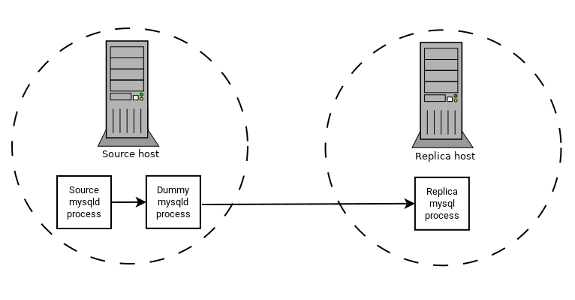
The source writes to its binary log. The “dummy”
mysqld process acts as a replica, applying the
desired combination of replicate-do-* and
replicate-ignore-* rules, and writes a new,
filtered binary log of its own. (See
Section 17.1.6, “Replication and Binary Logging Options and Variables”.) This filtered log is
provided to the replica.
The dummy process does not actually store any data, so there is little processing overhead incurred by running the additional mysqld process on the replication source server. This type of setup can be repeated with additional replicas.
INSERT triggers for
BLACKHOLE tables work as expected. However,
because the BLACKHOLE table does not actually
store any data, UPDATE and
DELETE triggers are not activated:
The FOR EACH ROW clause in the trigger definition
does not apply because there are no rows.
Other possible uses for the BLACKHOLE storage
engine include:
Verification of dump file syntax.
Measurement of the overhead from binary logging, by comparing performance using
BLACKHOLEwith and without binary logging enabled.BLACKHOLEis essentially a “no-op” storage engine, so it could be used for finding performance bottlenecks not related to the storage engine itself.
The BLACKHOLE engine is transaction-aware, in the
sense that committed transactions are written to the binary log and
rolled-back transactions are not.
Blackhole Engine and Auto Increment Columns
The BLACKHOLE engine is a no-op engine. Any
operations performed on a table using BLACKHOLE
have no effect. This should be borne in mind when considering the
behavior of primary key columns that auto increment. The engine does
not automatically increment field values, and does not retain auto
increment field state. This has important implications in
replication.
Consider the following replication scenario where all three of the following conditions apply:
On a source server there is a blackhole table with an auto increment field that is a primary key.
On a replica the same table exists but using the MyISAM engine.
Inserts are performed into the source's table without explicitly setting the auto increment value in the
INSERTstatement itself or through using aSET INSERT_IDstatement.
In this scenario replication fails with a duplicate entry error on the primary key column.
In statement based replication, the value of
INSERT_ID in the context event is always the
same. Replication therefore fails due to trying insert a row with a
duplicate value for a primary key column.
In row based replication, the value that the engine returns for the row always be the same for each insert. This results in the replica attempting to replay two insert log entries using the same value for the primary key column, and so replication fails.
Column Filtering
When using row-based replication,
(binlog_format=ROW), a replica
where the last columns are missing from a table is supported, as
described in the section
Section 17.5.1.9, “Replication with Differing Table Definitions on Source and Replica”.
This filtering works on the replica side, that is, the columns are copied to the replica before they are filtered out. There are at least two cases where it is not desirable to copy the columns to the replica:
If the data is confidential, so the replica server should not have access to it.
If the source has many replicas, filtering before sending to the replicas may reduce network traffic.
Source column filtering can be achieved using the
BLACKHOLE engine. This is carried out in a way
similar to how source table filtering is achieved - by using the
BLACKHOLE engine and the
--replicate-do-table or
--replicate-ignore-table option.
The setup for the source is:
CREATE TABLE t1 (public_col_1, ..., public_col_N,
secret_col_1, ..., secret_col_M) ENGINE=MyISAM;
The setup for the trusted replica is:
CREATE TABLE t1 (public_col_1, ..., public_col_N) ENGINE=BLACKHOLE;
The setup for the untrusted replica is:
CREATE TABLE t1 (public_col_1, ..., public_col_N) ENGINE=MyISAM;
The MERGE storage engine, also known as the
MRG_MyISAM engine, is a collection of identical
MyISAM tables that can be used as one.
“Identical” means that all tables have identical column
data types and index information. You cannot merge
MyISAM tables in which the columns are listed in
a different order, do not have exactly the same data types in
corresponding columns, or have the indexes in different order.
However, any or all of the MyISAM tables can be
compressed with myisampack. See
Section 4.6.6, “myisampack — Generate Compressed, Read-Only MyISAM Tables”. Differences between tables such as
these do not matter:
Names of corresponding columns and indexes can differ.
Comments for tables, columns, and indexes can differ.
Table options such as
AVG_ROW_LENGTH,MAX_ROWS, orPACK_KEYScan differ.
An alternative to a MERGE table is a partitioned
table, which stores partitions of a single table in separate files
and enables some operations to be performed more efficiently. For
more information, see Chapter 24, Partitioning.
When you create a MERGE table, MySQL creates a
.MRG file on disk that contains the names of
the underlying MyISAM tables that should be used
as one. The table format of the MERGE table is
stored in the MySQL data dictionary. The underlying tables do not
have to be in the same database as the MERGE
table.
You can use SELECT,
DELETE,
UPDATE, and
INSERT on MERGE
tables. You must have SELECT,
DELETE, and
UPDATE privileges on the
MyISAM tables that you map to a
MERGE table.
The use of MERGE tables entails the following
security issue: If a user has access to MyISAM
table t, that user can create a
MERGE table m that
accesses t. However, if the user's
privileges on t are subsequently
revoked, the user can continue to access
t by doing so through
m.
Use of DROP TABLE with a
MERGE table drops only the
MERGE specification. The underlying tables are
not affected.
To create a MERGE table, you must specify a
UNION=(
option that indicates which list-of-tables)MyISAM tables to use.
You can optionally specify an INSERT_METHOD
option to control how inserts into the MERGE
table take place. Use a value of FIRST or
LAST to cause inserts to be made in the first or
last underlying table, respectively. If you specify no
INSERT_METHOD option or if you specify it with a
value of NO, inserts into the
MERGE table are not permitted and attempts to do
so result in an error.
The following example shows how to create a MERGE
table:
mysql>CREATE TABLE t1 (->a INT NOT NULL AUTO_INCREMENT PRIMARY KEY,->message CHAR(20)) ENGINE=MyISAM;mysql>CREATE TABLE t2 (->a INT NOT NULL AUTO_INCREMENT PRIMARY KEY,->message CHAR(20)) ENGINE=MyISAM;mysql>INSERT INTO t1 (message) VALUES ('Testing'),('table'),('t1');mysql>INSERT INTO t2 (message) VALUES ('Testing'),('table'),('t2');mysql>CREATE TABLE total (->a INT NOT NULL AUTO_INCREMENT,->message CHAR(20), INDEX(a))->ENGINE=MERGE UNION=(t1,t2) INSERT_METHOD=LAST;
Column a is indexed as a PRIMARY
KEY in the underlying MyISAM tables,
but not in the MERGE table. There it is indexed
but not as a PRIMARY KEY because a
MERGE table cannot enforce uniqueness over the
set of underlying tables. (Similarly, a column with a
UNIQUE index in the underlying tables should be
indexed in the MERGE table but not as a
UNIQUE index.)
After creating the MERGE table, you can use it to
issue queries that operate on the group of tables as a whole:
mysql> SELECT * FROM total;
+---+---------+
| a | message |
+---+---------+
| 1 | Testing |
| 2 | table |
| 3 | t1 |
| 1 | Testing |
| 2 | table |
| 3 | t2 |
+---+---------+
To remap a MERGE table to a different collection
of MyISAM tables, you can use one of the
following methods:
DROPtheMERGEtable and re-create it.Use
ALTER TABLEto change the list of underlying tables.tbl_nameUNION=(...)It is also possible to use
ALTER TABLE ... UNION=()(that is, with an emptyUNIONclause) to remove all of the underlying tables. However, in this case, the table is effectively empty and inserts fail because there is no underlying table to take new rows. Such a table might be useful as a template for creating newMERGEtables withCREATE TABLE ... LIKE.
The underlying table definitions and indexes must conform closely to
the definition of the MERGE table. Conformance is
checked when a table that is part of a MERGE
table is opened, not when the MERGE table is
created. If any table fails the conformance checks, the operation
that triggered the opening of the table fails. This means that
changes to the definitions of tables within a
MERGE may cause a failure when the
MERGE table is accessed. The conformance checks
applied to each table are:
The underlying table and the
MERGEtable must have the same number of columns.The column order in the underlying table and the
MERGEtable must match.Additionally, the specification for each corresponding column in the parent
MERGEtable and the underlying tables are compared and must satisfy these checks:The column type in the underlying table and the
MERGEtable must be equal.The column length in the underlying table and the
MERGEtable must be equal.The column of the underlying table and the
MERGEtable can beNULL.
The underlying table must have at least as many indexes as the
MERGEtable. The underlying table may have more indexes than theMERGEtable, but cannot have fewer.NoteA known issue exists where indexes on the same columns must be in identical order, in both the
MERGEtable and the underlyingMyISAMtable. See Bug #33653.Each index must satisfy these checks:
The index type of the underlying table and the
MERGEtable must be the same.The number of index parts (that is, multiple columns within a compound index) in the index definition for the underlying table and the
MERGEtable must be the same.For each index part:
Index part lengths must be equal.
Index part types must be equal.
Index part languages must be equal.
Check whether index parts can be
NULL.
If a MERGE table cannot be opened or used because
of a problem with an underlying table, CHECK
TABLE displays information about which table caused the
problem.
Additional Resources
A forum dedicated to the
MERGEstorage engine is available at https://forums.mysql.com/list.php?93.
MERGE tables can help you solve the following
problems:
Easily manage a set of log tables. For example, you can put data from different months into separate tables, compress some of them with myisampack, and then create a
MERGEtable to use them as one.Obtain more speed. You can split a large read-only table based on some criteria, and then put individual tables on different disks. A
MERGEtable structured this way could be much faster than using a single large table.Perform more efficient searches. If you know exactly what you are looking for, you can search in just one of the underlying tables for some queries and use a
MERGEtable for others. You can even have many differentMERGEtables that use overlapping sets of tables.Perform more efficient repairs. It is easier to repair individual smaller tables that are mapped to a
MERGEtable than to repair a single large table.Instantly map many tables as one. A
MERGEtable need not maintain an index of its own because it uses the indexes of the individual tables. As a result,MERGEtable collections are very fast to create or remap. (You must still specify the index definitions when you create aMERGEtable, even though no indexes are created.)If you have a set of tables from which you create a large table on demand, you can instead create a
MERGEtable from them on demand. This is much faster and saves a lot of disk space.Exceed the file size limit for the operating system. Each
MyISAMtable is bound by this limit, but a collection ofMyISAMtables is not.You can create an alias or synonym for a
MyISAMtable by defining aMERGEtable that maps to that single table. There should be no really notable performance impact from doing this (only a couple of indirect calls andmemcpy()calls for each read).
The disadvantages of MERGE tables are:
You can use only identical
MyISAMtables for aMERGEtable.Some
MyISAMfeatures are unavailable inMERGEtables. For example, you cannot createFULLTEXTindexes onMERGEtables. (You can createFULLTEXTindexes on the underlyingMyISAMtables, but you cannot search theMERGEtable with a full-text search.)If the
MERGEtable is nontemporary, all underlyingMyISAMtables must be nontemporary. If theMERGEtable is temporary, theMyISAMtables can be any mix of temporary and nontemporary.MERGEtables use more file descriptors thanMyISAMtables. If 10 clients are using aMERGEtable that maps to 10 tables, the server uses (10 × 10) + 10 file descriptors. (10 data file descriptors for each of the 10 clients, and 10 index file descriptors shared among the clients.)Index reads are slower. When you read an index, the
MERGEstorage engine needs to issue a read on all underlying tables to check which one most closely matches a given index value. To read the next index value, theMERGEstorage engine needs to search the read buffers to find the next value. Only when one index buffer is used up does the storage engine need to read the next index block. This makesMERGEindexes much slower oneq_refsearches, but not much slower onrefsearches. For more information abouteq_refandref, see Section 13.8.2, “EXPLAIN Statement”.
The following are known problems with MERGE
tables:
In versions of MySQL Server prior to 5.1.23, it was possible to create temporary merge tables with nontemporary child MyISAM tables.
From versions 5.1.23, MERGE children were locked through the parent table. If the parent was temporary, it was not locked and so the children were not locked either. Parallel use of the MyISAM tables corrupted them.
If you use
ALTER TABLEto change aMERGEtable to another storage engine, the mapping to the underlying tables is lost. Instead, the rows from the underlyingMyISAMtables are copied into the altered table, which then uses the specified storage engine.The
INSERT_METHODtable option for aMERGEtable indicates which underlyingMyISAMtable to use for inserts into theMERGEtable. However, use of theAUTO_INCREMENTtable option for thatMyISAMtable has no effect for inserts into theMERGEtable until at least one row has been inserted directly into theMyISAMtable.A
MERGEtable cannot maintain uniqueness constraints over the entire table. When you perform anINSERT, the data goes into the first or lastMyISAMtable (as determined by theINSERT_METHODoption). MySQL ensures that unique key values remain unique within thatMyISAMtable, but not over all the underlying tables in the collection.Because the
MERGEengine cannot enforce uniqueness over the set of underlying tables,REPLACEdoes not work as expected. The two key facts are:REPLACEcan detect unique key violations only in the underlying table to which it is going to write (which is determined by theINSERT_METHODoption). This differs from violations in theMERGEtable itself.If
REPLACEdetects a unique key violation, it changes only the corresponding row in the underlying table it is writing to; that is, the first or last table, as determined by theINSERT_METHODoption.
Similar considerations apply for
INSERT ... ON DUPLICATE KEY UPDATE.MERGEtables do not support partitioning. That is, you cannot partition aMERGEtable, nor can any of aMERGEtable's underlyingMyISAMtables be partitioned.You should not use
ANALYZE TABLE,REPAIR TABLE,OPTIMIZE TABLE,ALTER TABLE,DROP TABLE,DELETEwithout aWHEREclause, orTRUNCATE TABLEon any of the tables that are mapped into an openMERGEtable. If you do so, theMERGEtable may still refer to the original table and yield unexpected results. To work around this problem, ensure that noMERGEtables remain open by issuing aFLUSH TABLESstatement prior to performing any of the named operations.The unexpected results include the possibility that the operation on the
MERGEtable reports table corruption. If this occurs after one of the named operations on the underlyingMyISAMtables, the corruption message is spurious. To deal with this, issue aFLUSH TABLESstatement after modifying theMyISAMtables.DROP TABLEon a table that is in use by aMERGEtable does not work on Windows because theMERGEstorage engine's table mapping is hidden from the upper layer of MySQL. Windows does not permit open files to be deleted, so you first must flush allMERGEtables (withFLUSH TABLES) or drop theMERGEtable before dropping the table.The definition of the
MyISAMtables and theMERGEtable are checked when the tables are accessed (for example, as part of aSELECTorINSERTstatement). The checks ensure that the definitions of the tables and the parentMERGEtable definition match by comparing column order, types, sizes and associated indexes. If there is a difference between the tables, an error is returned and the statement fails. Because these checks take place when the tables are opened, any changes to the definition of a single table, including column changes, column ordering, and engine alterations cause the statement to fail.The order of indexes in the
MERGEtable and its underlying tables should be the same. If you useALTER TABLEto add aUNIQUEindex to a table used in aMERGEtable, and then useALTER TABLEto add a nonunique index on theMERGEtable, the index ordering is different for the tables if there was already a nonunique index in the underlying table. (This happens becauseALTER TABLEputsUNIQUEindexes before nonunique indexes to facilitate rapid detection of duplicate keys.) Consequently, queries on tables with such indexes may return unexpected results.If you encounter an error message similar to ERROR 1017 (HY000): Can't find file: '
tbl_name.MRG' (errno: 2), it generally indicates that some of the underlying tables do not use theMyISAMstorage engine. Confirm that all of these tables areMyISAM.The maximum number of rows in a
MERGEtable is 264 (~1.844E+19; the same as for aMyISAMtable). It is not possible to merge multipleMyISAMtables into a singleMERGEtable that would have more than this number of rows.Use of underlying
MyISAMtables of differing row formats with a parentMERGEtable is currently known to fail. See Bug #32364.You cannot change the union list of a nontemporary
MERGEtable whenLOCK TABLESis in effect. The following does not work:CREATE TABLE m1 ... ENGINE=MRG_MYISAM ...; LOCK TABLES t1 WRITE, t2 WRITE, m1 WRITE; ALTER TABLE m1 ... UNION=(t1,t2) ...;
However, you can do this with a temporary
MERGEtable.You cannot create a
MERGEtable withCREATE ... SELECT, neither as a temporaryMERGEtable, nor as a nontemporaryMERGEtable. For example:CREATE TABLE m1 ... ENGINE=MRG_MYISAM ... SELECT ...;
Attempts to do this result in an error:
tbl_nameis notBASE TABLE.In some cases, differing
PACK_KEYStable option values among theMERGEand underlying tables cause unexpected results if the underlying tables containCHARorBINARYcolumns. As a workaround, useALTER TABLEto ensure that all involved tables have the samePACK_KEYSvalue. (Bug #50646)
The FEDERATED storage engine lets you access data
from a remote MySQL database without using replication or cluster
technology. Querying a local FEDERATED table
automatically pulls the data from the remote (federated) tables. No
data is stored on the local tables.
To include the FEDERATED storage engine if you
build MySQL from source, invoke CMake with the
-DWITH_FEDERATED_STORAGE_ENGINE
option.
The FEDERATED storage engine is not enabled by
default in the running server; to enable
FEDERATED, you must start the MySQL server binary
using the --federated option.
To examine the source for the FEDERATED engine,
look in the storage/federated directory of a
MySQL source distribution.
When you create a table using one of the standard storage engines
(such as MyISAM, CSV or
InnoDB), the table consists of the table
definition and the associated data. When you create a
FEDERATED table, the table definition is the
same, but the physical storage of the data is handled on a remote
server.
A FEDERATED table consists of two elements:
A remote server with a database table, which in turn consists of the table definition (stored in the MySQL data dictionary) and the associated table. The table type of the remote table may be any type supported by the remote
mysqldserver, includingMyISAMorInnoDB.A local server with a database table, where the table definition matches that of the corresponding table on the remote server. The table definition is stored in the data dictionary. There is no data file on the local server. Instead, the table definition includes a connection string that points to the remote table.
When executing queries and statements on a
FEDERATED table on the local server, the
operations that would normally insert, update or delete
information from a local data file are instead sent to the remote
server for execution, where they update the data file on the
remote server or return matching rows from the remote server.
The basic structure of a FEDERATED table setup
is shown in Figure 16.2, “FEDERATED Table Structure”.
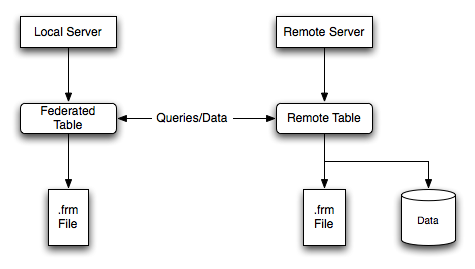
When a client issues an SQL statement that refers to a
FEDERATED table, the flow of information
between the local server (where the SQL statement is executed) and
the remote server (where the data is physically stored) is as
follows:
The storage engine looks through each column that the
FEDERATEDtable has and constructs an appropriate SQL statement that refers to the remote table.The statement is sent to the remote server using the MySQL client API.
The remote server processes the statement and the local server retrieves any result that the statement produces (an affected-rows count or a result set).
If the statement produces a result set, each column is converted to internal storage engine format that the
FEDERATEDengine expects and can use to display the result to the client that issued the original statement.
The local server communicates with the remote server using MySQL
client C API functions. It invokes
mysql_real_query() to send the
statement. To read a result set, it uses
mysql_store_result() and fetches
rows one at a time using
mysql_fetch_row().
To create a FEDERATED table you should follow
these steps:
Create the table on the remote server. Alternatively, make a note of the table definition of an existing table, perhaps using the
SHOW CREATE TABLEstatement.Create the table on the local server with an identical table definition, but adding the connection information that links the local table to the remote table.
For example, you could create the following table on the remote server:
CREATE TABLE test_table (
id INT(20) NOT NULL AUTO_INCREMENT,
name VARCHAR(32) NOT NULL DEFAULT '',
other INT(20) NOT NULL DEFAULT '0',
PRIMARY KEY (id),
INDEX name (name),
INDEX other_key (other)
)
ENGINE=MyISAM
DEFAULT CHARSET=utf8mb4;
To create the local table that is federated to the remote table,
there are two options available. You can either create the local
table and specify the connection string (containing the server
name, login, password) to be used to connect to the remote table
using the CONNECTION, or you can use an
existing connection that you have previously created using the
CREATE SERVER statement.
When you create the local table it must have an identical field definition to the remote table.
You can improve the performance of a
FEDERATED table by adding indexes to the
table on the host. The optimization occurs because the query
sent to the remote server includes the contents of the
WHERE clause and is sent to the remote server
and subsequently executed locally. This reduces the network
traffic that would otherwise request the entire table from the
server for local processing.
To use the first method, you must specify the
CONNECTION string after the engine type in a
CREATE TABLE statement. For
example:
CREATE TABLE federated_table (
id INT(20) NOT NULL AUTO_INCREMENT,
name VARCHAR(32) NOT NULL DEFAULT '',
other INT(20) NOT NULL DEFAULT '0',
PRIMARY KEY (id),
INDEX name (name),
INDEX other_key (other)
)
ENGINE=FEDERATED
DEFAULT CHARSET=utf8mb4
CONNECTION='mysql://fed_user@remote_host:9306/federated/test_table';
CONNECTION replaces the
COMMENT used in some previous versions of
MySQL.
The CONNECTION string contains the
information required to connect to the remote server containing
the table in which the data physically resides. The connection
string specifies the server name, login credentials, port number
and database/table information. In the example, the remote table
is on the server remote_host, using port
9306. The name and port number should match the host name (or IP
address) and port number of the remote MySQL server instance you
want to use as your remote table.
The format of the connection string is as follows:
scheme://user_name[:password]@host_name[:port_num]/db_name/tbl_name
Where:
scheme: A recognized connection protocol. Onlymysqlis supported as theschemevalue at this point.user_name: The user name for the connection. This user must have been created on the remote server, and must have suitable privileges to perform the required actions (SELECT,INSERT,UPDATE, and so forth) on the remote table.password: (Optional) The corresponding password foruser_name.host_name: The host name or IP address of the remote server.port_num: (Optional) The port number for the remote server. The default is 3306.db_name: The name of the database holding the remote table.tbl_name: The name of the remote table. The name of the local and the remote table do not have to match.
Sample connection strings:
CONNECTION='mysql://username:password@hostname:port/database/tablename' CONNECTION='mysql://username@hostname/database/tablename' CONNECTION='mysql://username:password@hostname/database/tablename'
If you are creating a number of FEDERATED
tables on the same server, or if you want to simplify the
process of creating FEDERATED tables, you can
use the CREATE SERVER statement
to define the server connection parameters, just as you would
with the CONNECTION string.
The format of the CREATE SERVER
statement is:
CREATE SERVERserver_nameFOREIGN DATA WRAPPERwrapper_nameOPTIONS (option[,option] ...)
The server_name is used in the
connection string when creating a new
FEDERATED table.
For example, to create a server connection identical to the
CONNECTION string:
CONNECTION='mysql://fed_user@remote_host:9306/federated/test_table';
You would use the following statement:
CREATE SERVER fedlink FOREIGN DATA WRAPPER mysql OPTIONS (USER 'fed_user', HOST 'remote_host', PORT 9306, DATABASE 'federated');
To create a FEDERATED table that uses this
connection, you still use the CONNECTION
keyword, but specify the name you used in the
CREATE SERVER statement.
CREATE TABLE test_table (
id INT(20) NOT NULL AUTO_INCREMENT,
name VARCHAR(32) NOT NULL DEFAULT '',
other INT(20) NOT NULL DEFAULT '0',
PRIMARY KEY (id),
INDEX name (name),
INDEX other_key (other)
)
ENGINE=FEDERATED
DEFAULT CHARSET=utf8mb4
CONNECTION='fedlink/test_table';
The connection name in this example contains the name of the
connection (fedlink) and the name of the
table (test_table) to link to, separated by a
slash. If you specify only the connection name without a table
name, the table name of the local table is used instead.
For more information on CREATE
SERVER, see Section 13.1.18, “CREATE SERVER Statement”.
The CREATE SERVER statement
accepts the same arguments as the CONNECTION
string. The CREATE SERVER
statement updates the rows in the
mysql.servers table. See the following table
for information on the correspondence between parameters in a
connection string, options in the CREATE
SERVER statement, and the columns in the
mysql.servers table. For reference, the
format of the CONNECTION string is as
follows:
scheme://user_name[:password]@host_name[:port_num]/db_name/tbl_name
| Description | CONNECTION string |
CREATE SERVER option |
mysql.servers column |
|---|---|---|---|
| Connection scheme | scheme |
wrapper_name |
Wrapper |
| Remote user | user_name |
USER |
Username |
| Remote password | password |
PASSWORD |
Password |
| Remote host | host_name |
HOST |
Host |
| Remote port | port_num |
PORT |
Port |
| Remote database | db_name |
DATABASE |
Db |
You should be aware of the following points when using the
FEDERATED storage engine:
FEDERATEDtables may be replicated to other replicas, but you must ensure that the replica servers are able to use the user/password combination that is defined in theCONNECTIONstring (or the row in themysql.serverstable) to connect to the remote server.
The following items indicate features that the
FEDERATED storage engine does and does not
support:
The remote server must be a MySQL server.
The remote table that a
FEDERATEDtable points to must exist before you try to access the table through theFEDERATEDtable.It is possible for one
FEDERATEDtable to point to another, but you must be careful not to create a loop.A
FEDERATEDtable does not support indexes in the usual sense; because access to the table data is handled remotely, it is actually the remote table that makes use of indexes. This means that, for a query that cannot use any indexes and so requires a full table scan, the server fetches all rows from the remote table and filters them locally. This occurs regardless of anyWHEREorLIMITused with thisSELECTstatement; these clauses are applied locally to the returned rows.Queries that fail to use indexes can thus cause poor performance and network overload. In addition, since returned rows must be stored in memory, such a query can also lead to the local server swapping, or even hanging.
Care should be taken when creating a
FEDERATEDtable since the index definition from an equivalentMyISAMor other table may not be supported. For example, creating aFEDERATEDtable fails if the table uses an index prefix on anyVARCHAR,TEXTorBLOBcolumns. The following definition usingMyISAMis valid:CREATE TABLE `T1`(`A` VARCHAR(100),UNIQUE KEY(`A`(30))) ENGINE=MYISAM;
The key prefix in this example is incompatible with the
FEDERATEDengine, and the equivalent statement fails:CREATE TABLE `T1`(`A` VARCHAR(100),UNIQUE KEY(`A`(30))) ENGINE=FEDERATED CONNECTION='MYSQL://127.0.0.1:3306/TEST/T1';
If possible, you should try to separate the column and index definition when creating tables on both the remote server and the local server to avoid these index issues.
Internally, the implementation uses
SELECT,INSERT,UPDATE, andDELETE, but notHANDLER.The
FEDERATEDstorage engine supportsSELECT,INSERT,UPDATE,DELETE,TRUNCATE TABLE, and indexes. It does not supportALTER TABLE, or any Data Definition Language statements that directly affect the structure of the table, other thanDROP TABLE. The current implementation does not use prepared statements.FEDERATEDacceptsINSERT ... ON DUPLICATE KEY UPDATEstatements, but if a duplicate-key violation occurs, the statement fails with an error.Transactions are not supported.
FEDERATEDperforms bulk-insert handling such that multiple rows are sent to the remote table in a batch, which improves performance. Also, if the remote table is transactional, it enables the remote storage engine to perform statement rollback properly should an error occur. This capability has the following limitations:The size of the insert cannot exceed the maximum packet size between servers. If the insert exceeds this size, it is broken into multiple packets and the rollback problem can occur.
Bulk-insert handling does not occur for
INSERT ... ON DUPLICATE KEY UPDATE.
There is no way for the
FEDERATEDengine to know if the remote table has changed. The reason for this is that this table must work like a data file that would never be written to by anything other than the database system. The integrity of the data in the local table could be breached if there was any change to the remote database.When using a
CONNECTIONstring, you cannot use an '@' character in the password. You can get round this limitation by using theCREATE SERVERstatement to create a server connection.The
insert_idandtimestampoptions are not propagated to the data provider.Any
DROP TABLEstatement issued against aFEDERATEDtable drops only the local table, not the remote table.FEDERATEDtables do not work with the query cache.User-defined partitioning is not supported for
FEDERATEDtables.
The following additional resources are available for the
FEDERATED storage engine:
A forum dedicated to the
FEDERATEDstorage engine is available at https://forums.mysql.com/list.php?105.
The EXAMPLE storage engine is a stub engine that
does nothing. Its purpose is to serve as an example in the MySQL
source code that illustrates how to begin writing new storage
engines. As such, it is primarily of interest to developers.
To enable the EXAMPLE storage engine if you build
MySQL from source, invoke CMake with the
-DWITH_EXAMPLE_STORAGE_ENGINE
option.
To examine the source for the EXAMPLE engine,
look in the storage/example directory of a
MySQL source distribution.
When you create an EXAMPLE table, no files are
created. No data can be stored into the table. Retrievals return an
empty result.
mysql>CREATE TABLE test (i INT) ENGINE = EXAMPLE;Query OK, 0 rows affected (0.78 sec) mysql>INSERT INTO test VALUES(1),(2),(3);ERROR 1031 (HY000): Table storage engine for 'test' doesn't » have this option mysql>SELECT * FROM test;Empty set (0.31 sec)
The EXAMPLE storage engine does not support
indexing.
The EXAMPLE storage engine does not support
partitioning.
Other storage engines may be available from third parties and community members that have used the Custom Storage Engine interface.
Third party engines are not supported by MySQL. For further information, documentation, installation guides, bug reporting or for any help or assistance with these engines, please contact the developer of the engine directly.
For more information on developing a customer storage engine that can be used with the Pluggable Storage Engine Architecture, see MySQL Internals: Writing a Custom Storage Engine.
The MySQL pluggable storage engine architecture enables a database professional to select a specialized storage engine for a particular application need while being completely shielded from the need to manage any specific application coding requirements. The MySQL server architecture isolates the application programmer and DBA from all of the low-level implementation details at the storage level, providing a consistent and easy application model and API. Thus, although there are different capabilities across different storage engines, the application is shielded from these differences.
The MySQL pluggable storage engine architecture is shown in Figure 16.3, “MySQL Architecture with Pluggable Storage Engines”.
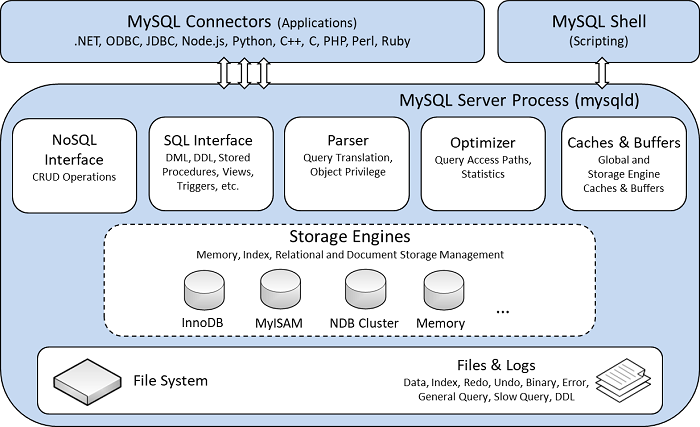
The pluggable storage engine architecture provides a standard set of management and support services that are common among all underlying storage engines. The storage engines themselves are the components of the database server that actually perform actions on the underlying data that is maintained at the physical server level.
This efficient and modular architecture provides huge benefits for those wishing to specifically target a particular application need—such as data warehousing, transaction processing, or high availability situations—while enjoying the advantage of utilizing a set of interfaces and services that are independent of any one storage engine.
The application programmer and DBA interact with the MySQL database through Connector APIs and service layers that are above the storage engines. If application changes bring about requirements that demand the underlying storage engine change, or that one or more storage engines be added to support new needs, no significant coding or process changes are required to make things work. The MySQL server architecture shields the application from the underlying complexity of the storage engine by presenting a consistent and easy-to-use API that applies across storage engines.
MySQL Server uses a pluggable storage engine architecture that enables storage engines to be loaded into and unloaded from a running MySQL server.
Plugging in a Storage Engine
Before a storage engine can be used, the storage engine plugin
shared library must be loaded into MySQL using the
INSTALL PLUGIN statement. For
example, if the EXAMPLE engine plugin is
named example and the shared library is named
ha_example.so, you load it with the
following statement:
INSTALL PLUGIN example SONAME 'ha_example.so';
To install a pluggable storage engine, the plugin file must be
located in the MySQL plugin directory, and the user issuing the
INSTALL PLUGIN statement must
have INSERT privilege for the
mysql.plugin table.
The shared library must be located in the MySQL server plugin
directory, the location of which is given by the
plugin_dir system variable.
Unplugging a Storage Engine
To unplug a storage engine, use the
UNINSTALL PLUGIN statement:
UNINSTALL PLUGIN example;
If you unplug a storage engine that is needed by existing tables, those tables become inaccessible, but are still present on disk (where applicable). Ensure that there are no tables using a storage engine before you unplug the storage engine.
A MySQL pluggable storage engine is the component in the MySQL database server that is responsible for performing the actual data I/O operations for a database as well as enabling and enforcing certain feature sets that target a specific application need. A major benefit of using specific storage engines is that you are only delivered the features needed for a particular application, and therefore you have less system overhead in the database, with the end result being more efficient and higher database performance. This is one of the reasons that MySQL has always been known to have such high performance, matching or beating proprietary monolithic databases in industry standard benchmarks.
From a technical perspective, what are some of the unique supporting infrastructure components that are in a storage engine? Some of the key feature differentiations include:
Concurrency: Some applications have more granular lock requirements (such as row-level locks) than others. Choosing the right locking strategy can reduce overhead and therefore improve overall performance. This area also includes support for capabilities such as multi-version concurrency control or “snapshot” read.
Transaction Support: Not every application needs transactions, but for those that do, there are very well defined requirements such as ACID compliance and more.
Referential Integrity: The need to have the server enforce relational database referential integrity through DDL defined foreign keys.
Physical Storage: This involves everything from the overall page size for tables and indexes as well as the format used for storing data to physical disk.
Index Support: Different application scenarios tend to benefit from different index strategies. Each storage engine generally has its own indexing methods, although some (such as B-tree indexes) are common to nearly all engines.
Memory Caches: Different applications respond better to some memory caching strategies than others, so although some memory caches are common to all storage engines (such as those used for user connections), others are uniquely defined only when a particular storage engine is put in play.
Performance Aids: This includes multiple I/O threads for parallel operations, thread concurrency, database checkpointing, bulk insert handling, and more.
Miscellaneous Target Features: This may include support for geospatial operations, security restrictions for certain data manipulation operations, and other similar features.
Each set of the pluggable storage engine infrastructure components are designed to offer a selective set of benefits for a particular application. Conversely, avoiding a set of component features helps reduce unnecessary overhead. It stands to reason that understanding a particular application's set of requirements and selecting the proper MySQL storage engine can have a dramatic impact on overall system efficiency and performance.